










Trusted By Thousands of Companies Around the World
See Everything In One Place
Eliminate Manual Work
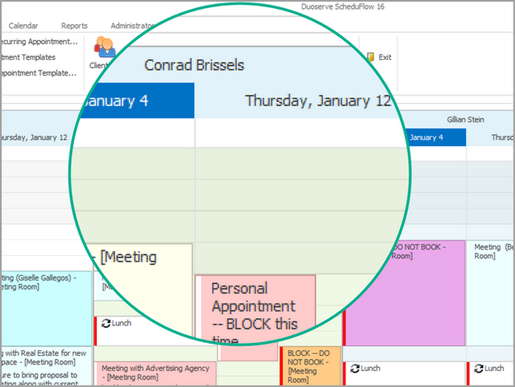
See your client or patient info all in one place so you can easily pull up their latest appointment information with one simple search. Add them to the client list, schedule, search, simple. No manual work needed.
Start Your Free TrialSimplify Your Workflow
Save Time and Money
Capture new leads online or by phone, and then manage them by scheduling appointments, consultations, and meetings with speed and simplicity. Assign employees tasks or schedule shifts to get the work done. Get paid.
Learn More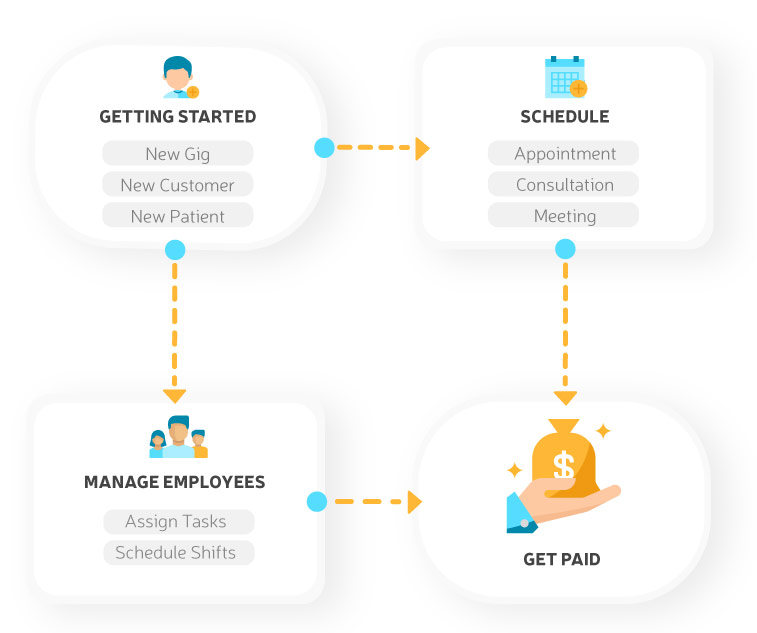
Share Calendars Live
Anytime, Anywhere!
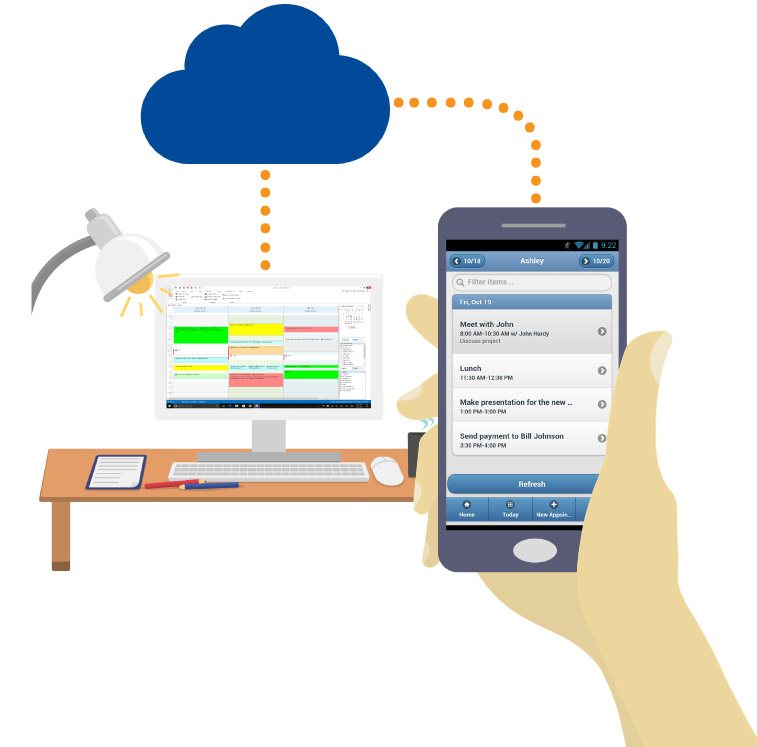
Schedule your appointments from your computer and view them on any device. You and your employees can see changes in real time.
Start Your Free Trial"ScheduFlow increased our efficiency by 80%"
"Double booking of appointments and missed appointments have totally gone away. With ScheduFlow we really don't have any appointment software issues anymore which makes everyone very happy. When our clients show up, we make money!"
Patrick Burch, Business Manager & Co-Owner at Neurotherapy Northwest, LLC Try it FreeNo Credit Card Required


Thousands of small business owners made the right choice



Top Features
Hover mouse or tap on features to see more...
Your Scheduler, Your Colors
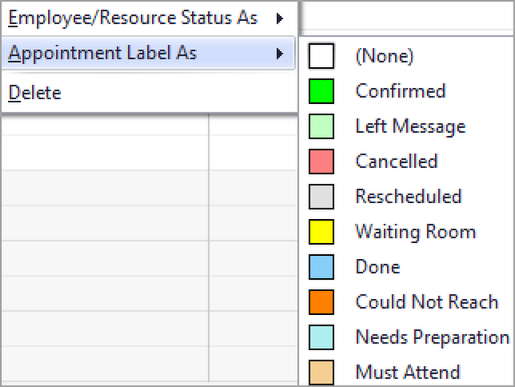
Customize it all. Define your own labels and statuses, and give them your own custom colors. Watch Video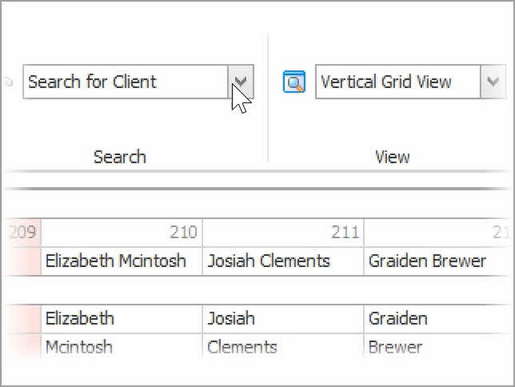
The Fastest Client Search Ever
Find client appointments in seconds. Easily accessible search is on the top right of your screen. No other system comes close when you need to reschedule or service your busy clients. Watch Video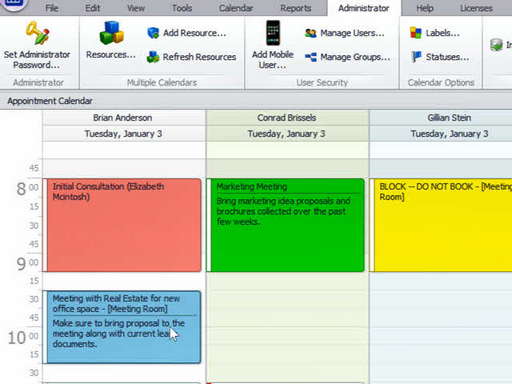
Simple Rescheduling : Drag & Drop
Along with our flexible calendar visualizations, you can reschedule appointments with a simple drag and drop. Watch Video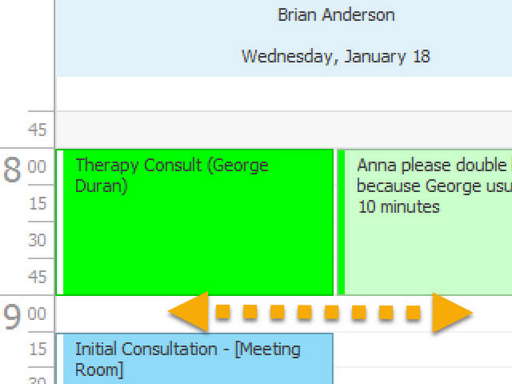
Allow or Prohibit Double Booking
ScheduFlow is defaulted to full permissions, allowing you to put multiple appointments in the same slot. However, you have the option to disable double booking, to suit your organization's needs. Watch Video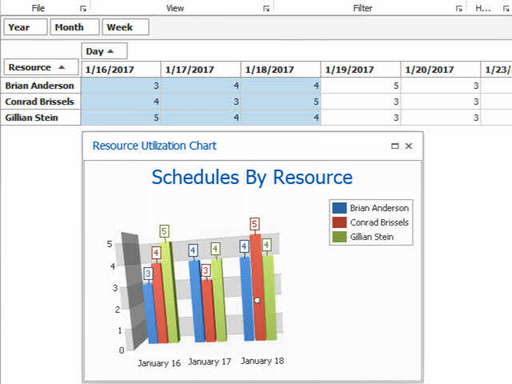
Visualize Resource Utilization
Quickly scan which employee has too many or too few appointments. You can adjust visible dates with a simple highlight to see more details. Watch VideoPricing
Monthly
Yearly
Free
$0Monthly
$0Yearly
- Full Access
- Unlimited Appointments
- Unlimited Clients
- 1 Computers
- 0 Calendars (People/Places)
- Free Email Support
- Need More Computers? See Full Pricelist.
Starter
$39.95Monthly
$456Yearly - 5% Off Monthly
- Full Access
- Unlimited Appointments
- Unlimited Clients
- 2 Computers
- 20 Calendars (People/Places)
- Free Email Support
- Need More Computers? See Full Pricelist.
Most Popular
$69.95Monthly
$798Yearly - 5% Off Monthly
- Full Access
- Unlimited Appointments
- Unlimited Clients
- 5 Computers
- 50 Calendars (People/Places)
- Free Phone & Email Support
- Need More Computers? See Full Pricelist.
Custom
$234.95Monthly
$2679Yearly - 5% Off Monthly
- Full Access
- Unlimited Appointments
- Unlimited Clients
- 25 Computers
- 250 Calendars (People/Places)
- Free Phone & Email Support
- Need More Computers? See Full Pricelist.
Frequenty Asked Questions
Click on a question for its answer...
What do you mean by 'True Desktop Software'?
Duoserve is the only company to make a native appointment scheduling desktop application store your data in the cloud. This melding of Internet with desktop software is much more powerful in terms of features, reliability, and responsiveness. A web calendar cannot give you the experience a desktop software can. Lets put it this way: would you use Adobe Photoshop or Microsoft Word in a web browser? Would you rather use your Yelp app or go to yelp.com on your phone? Same goes with ScheduFlow. It's a native Windows app that utilizes all the powers of your desktop computer.
How is ScheduFlow more powerful than other web calendars?
ScheduFlow allows you to harness the power of a full-fledged desktop application and the portability of a web solution. Just like your other installed software programs, ScheduFlow can run in the background, start up when your computer starts, pop up reminders when you are working on something else, and automatically refresh your data while running in the background. These are all the benefits of traditional software that we are all used to, but ScheduFlow has the added networking capability of the cloud allowing you to access your calendars from any desktop or mobile device. In addition, ScheduFlow has no third party dependencies. Web calendars depend on third-party web browsers. What happens when a new version (of FireFox, Chrome, Internet Explorer, etc.) comes out? Things break. Web browsers are great for news websites, Facebook, shopping etc. But not for your mission critical application.
How do I start my Free 30 Day Trial?
Simply click on the 'Try It Free' button on the top menu. This will quickly download our desktop application to your computer. Once the application opens, you will need to enter some basic contact information to create the account. You can then easily go to other computers and download the application and log in -- it will already be networked and shared. It's that simple!
If I sign up for my Free 30 Days Trial, will I get spammed or called endlessly?
No. We might call you a couple of days into your trial to see how you're doing. If you request not to be called back, we will honor it. It's that simple. We know that in the end, a good product will sell itself.
Is a credit card required for the Free 30 Days?
No. We just ask for some basic contact information to avoid abuse to our systems.
Do I lose my information after the Free 30 Days?
No. You can continue with all the information entered during the trial when you sign up. If you don't sign up after your 30 day trial has ended, we will put your database in a grace period for some time, just in case you didn't have time to go online and sign up. After the reasonable grace period, your data will be completely erased.
Do I have to call and cancel my trial account after the Free 30 Day Trial has ended?
No. The trial ends and that is all. You're a free bird.
Will I be billed after the Free 30 Days automatically?
No. You will not be billed or charged automatically. You will have to specifically go to our website and submit billing information if you wish to continue past the free trial.
How long has Duoserve been a company?
We have been a company since 2001. We have grown each and every year with very few customers dropping out. In fact, we have many customers that have been using our desktop applications for over a decade. Our stability and the quality of our products have withstood the test of time. The few customers who have stopped using our products and services usually state that they are closing their doors as the primary reason. Software bugs or pricing issues are almost never the reason why customers leave us because our products are rock solid and we do not bait and switch.
Why are ScheduFlow prices so low? Is that a good sign and will you be in business with that pricing?
In short, efficiency is key. Customers sometimes ask this question to make sure they are getting the best bang for their buck. We believe our pricing is reasonable, and the prices of our competitors are expensive. While many of our competitors do forced selling with heavy marketing, sales and support staff, our funds are mostly allocated into development and research. This allows us to avoid the need to oversell or constantly fix a broken product. A majority of our customers have never even contacted support or even our sales team. We have a simple, yet powerful business model. Make a great product, let customers try it for free, and pass along the savings. Our number of years in business, number of customers, and our word of mouth referral base allows us to price things in a way no one can come close to.
Do you have live humans I can talk to?
Yes. We offer unlimited technical phone support for every plan except the starter plan. Occassionally, we cheat for starter plans and will give you a call back if you submit an online support ticket and ask to be called back. In fact, if you're not able to use the software for any reason (your billing had a problem past the grace period, your computer went up in smokes, you got a new computer) we will do whatever it takes to get you back up ASAP.
Can I quit your service anytime?
Yes, if you are on the monthly subscription plan. However if you sign up for a yearly agreement or have been issued a custom quote you must abide by the terms. We don't believe in keeping unhappy customers bound. Since 2001 we have never had any legal issues, BBB, or governing body complaints. We honor what we promise and keep our prices stable. We will only raise prices if the cost of living has forced us to. We are not out to price gouge. We want to make our customers happy. It has worked for us with endless referrals especially from tech and IT workers who implement our software.
How do I know you guys aren't going to bait and switch me?
It's simple: we don't like bait and switch tactics. It's the reason we are rated 5-Stars by users on review websites and 5-Stars by editors such as CNET/Download.com. Unfortunately, the very few competitors of ours that have a reasonable feature set bait and switch their customers (read their reviews). Some don't even let you try their product prior to purchasing. They want to "bind" you into a contract before you can even think. Many of our customers try our program after being promised so much from their previous vendor. These claims don't come from our marketing department, but from disgruntled customers of other products who have become our customers. The company was founded on the basis that if you're truthful and honest, and you really treat your customers the way you'd treat family, then you're ultimately going to succeed. We do not over promise. In fact, when some customers say they want to sign up directly and start paying we urge them to use our free 30 day trial first. It keeps our customers comfortable, reduces sales friction, and gives our customers 1 Extra Free month. Why Not!
I'm not a spa/salon. Do I have to deal with all those features I don't use.
ScheduFlow works for any business. ScheduFlow was designed from the ground up to be modular in the sense that we give you the basic tools to run any business that needs a scheduling product. We have users in every major industry and subindustry. How do we manage to please customers in different industries? The generic aspects of ScheduFlow, along with its simplicity, allow you to implement only what you need to use. For example, ScheduFlow allows you to enable user security. However, this feature is not required and a small shop may not need it, so it's disabled by default. We don't implement features that help us "capitalize" or "cross sell" on you or your data.
Does ScheduFlow work for my industry?
Most likely yes. ScheduFlow was built to work for almost any industry. We have customers in every sector and in over 100 subindustry types. The diversity of our customer base is mind blowing. Our competitors target one or two industries at most (ie salons, spas, etc). Over ten years of experience has forced us to build the genius behind ScheduFlow. It is not the amount of features we throw at our customers, but years of feedback that has helped us fit almost every business scenario. ScheduFlow was designed from basic modules that fluently work with each other. Each industry needs several feature sets to get a good working solution. We take great care to make our feature sets are loosely coupled. What that means is that you don't need one feature to make another feature work. This cascading effect of "feature dependency" causes what programmers call "spaghetti code". When this happens, you need to go through hoops and configuration nightmares. Our customers are pleasantly surpised when they get started without needing to read a single page of documentation. When features are not so tightly intertwined you get to pick and choose when and how those features work. This ingenious methodology not only makes ScheduFlow pairable with almost any industry but it makes our developers grow the application feature sets without bugs in one area of the application affecting other areas. This keeps the application rock solid as we grow it. Our product has been so reliable and easy to use that we almost don't have a single negative review. 5-Stars across the board!
How secure is my data?
Very secure. Your data is hosted in a Grade A Datacenter and is backed up several times a day. No individuals in our company have physical access to the servers. The individuals who can log into your computer system cannot see the data unless you provide your user name and password voluntarily which secures each "database". All traffic is encrypted to and from the client software and servers. User security can also be setup for medical facilities that use it to enforce policies.
Is ScheduFlow HIPAA Compliant?
ScheduFlow can help your organization be HIPAA compliant. Read the faq about data security for specifics. In addition to general security measures stated in the security FAQ, ScheduFlow allows you to set up user security for medical facilities that use it to enforce specific user policies (e.g. read only privileges, disable delete for a user, etc.). However, being a "HIPAA compliant software" is a misused statement. HIPAA compliance requires not just offering basic security feature sets, but enforcing them on your employees and users with other internal HIPAA policies (screens not showing in plain view etc). In short, ScheduFlow can help you achieve HIPAA compliancy, but you need to make sure that you utilize the feature sets correctly. Please consult with your legal advisor or someone with HIPAA compliancy expertise to help you enforce the rules correctly. Duoserve is limited in its capacity to advise in this area, although we offer the basic mechanisms for obtaining compliancy (ie User Security, Encryption, etc).